Boat plans you can tap, and every drawing where you expect it
Put your general arrangement and system plans to work: pins on every piece of equipment, coloured by maintenance status, and every yard drawing and wiring diagram filed under its system number.
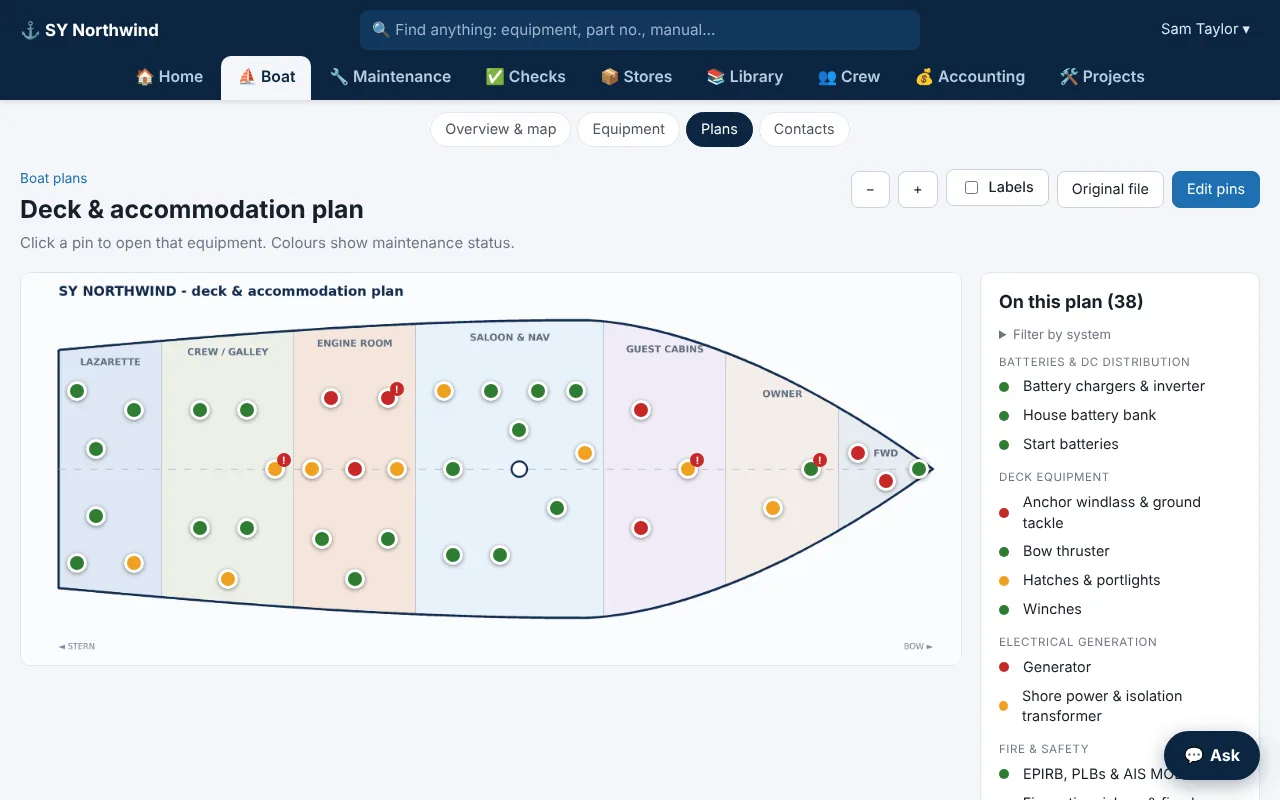
Interactive boat plans with equipment pins
Upload your general arrangement, deck, tank or system plans as layers. Drop a pin on every piece of equipment and the plan becomes a live view of the boat: each pin is coloured by maintenance status, and tapping it opens the equipment.
- Layers for deck, accommodation, machinery and systems
- Pins coloured green, amber or red by what's due
- New crew learn where everything is in a day
Every yard drawing, filed by system number
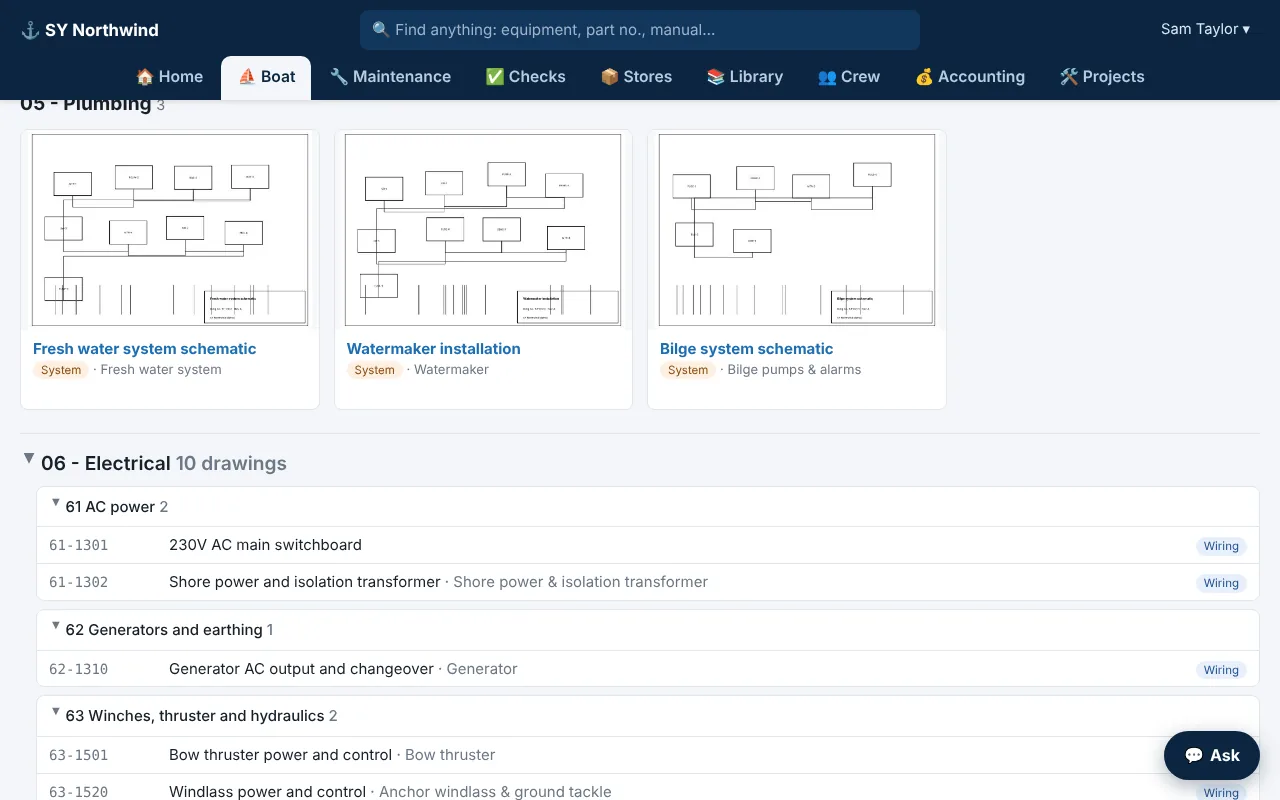
The plans tab keeps the yard's drawings, wiring diagrams and schematics in order, grouped by the yard's own system numbering with thumbnails you can recognise at a glance. Big groups like electrical and electronics fold by series so a hundred diagrams stay easy to browse, and a search box finds any drawing by number or title.
Open a drawing in the viewer, page through it, and step to the next drawing in the same group without going back.
Drawings linked to equipment
Each drawing can be linked to the equipment it shows, so the hydraulic schematic appears on the hydraulic power pack's page and the DC distribution diagram on the switchboard's. On our own boat we went through every drawing and parts list and linked them all as part of loading the equipment register.
See also: the equipment register · organising manuals and drawings
Frequently asked questions
What do the pins on the plan show?
Each pin is a piece of equipment. Its colour shows whether anything is overdue, due soon or fine, and tapping it opens the equipment with its tasks, history and manual.
Can we have more than one plan?
Yes. Layer deck, accommodation, tank and system plans and switch between them. Each layer has its own pins.
How are yard drawings organised?
By the yard's own drawing number and system group, with thumbnails, a search box and a page-by-page viewer. Large groups such as electrical are folded by series so they stay easy to browse.
More Boat Console features
Planned maintenance
Every job on the boat, scheduled by calendar, by engine hours, or both, whichever comes first.
Learn moreEquipment & spare parts
Every system, piece of equipment and component, with maker, model, serial and part numbers, where it lives on the boat, the manual that covers it, and the spares you carry for it.
Learn moreManuals & AI search
Stop digging through the ship's library or a shared drive.
Learn moreStores & provisions
Spares, consumables and provisions with the locker they live in and a minimum stock level.
Learn moreChecklists & rounds
Engine room rounds, pre-departure and arrival checks, guest-ready walkthroughs.
Learn moreHours of rest (MLC)
Crew record their rest periods, Boat Console checks them against the 10-hours-in-24 and 77-hours-in-7-days limits and the split-rest rules, and you print a clean record when anyone asks.
Learn moreCertificates & documents
Vessel certificates, surveys, crew tickets and medicals, each with an expiry date and an early warning, alongside the boat's documents and contacts.
Learn moreAccounting & expenses
Record every purchase against a category, a piece of equipment or a project, attach the receipt, and produce a tidy report for the owner, family office or management company.
Learn moreProjects & refit
Plan a refit, a winter yard period or an upgrade as a project with tasks, contractor, dates and a budget, and see what it actually cost as expenses come in.
Learn moreAI fault diagnosis
Describe the problem, add a photo of the alarm panel, and work through it step by step with AI that reads the equipment's manuals, its service history, overdue maintenance and the spares you carry.
Learn morePassage log
Log every passage, delivery and berth move with times, miles, engine hours, fuel and people on board, and the engine's running hours move on by themselves, so hours-based maintenance falls due on time.
Learn moreYour data & security
Every vessel runs in its own private, isolated instance, never pooled with other boats.
Learn moreSee Boat Console on a demo boat
Click around a fully loaded demo yacht, no sign-up needed. When you're ready, your own boat is set up in minutes.